
Download ACFT APK – ACFT calculator, Army Combat Fitness Test, fitness tracker, military fitness, ACFT score, ACFT score tracker
Overview
The ACFT app is a dedicated Android tool designed to assist military personnel and fitness enthusiasts in calculating and tracking their Army Combat Fitness Test (ACFT) scores. Developed by dtechyogi, the application serves as a digital companion for individuals preparing for or maintaining compliance with the ACFT standards. Its primary purpose is to simplify the process of scoring each event within the test, reducing the potential for human error during manual calculations. The app addresses the need for quick, accurate score evaluation, particularly in field environments where access to official scoring tools may be limited.
Target users include active-duty service members, reservists, National Guard personnel, and civilian fitness professionals who train military applicants. The app supports real-world scenarios such as pre-test preparation, post-test evaluation, and long-term fitness progress tracking. By saving historical records, users can monitor improvements over time and adjust training regimens accordingly. The developer did not provide additional details about the company’s background beyond the name.
While the app is currently available only on Android 13.0, it functions as a standalone utility that does not require an internet connection for core operations. Its free availability on the Google Play Store enhances accessibility for users across various military units and training centers.
Key Features & Capabilities
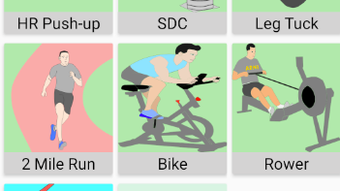
- ACFT Calculator – A step-by-step interface that guides users through inputting scores from each of the six ACFT events: 3-rep max deadlift, standing power throw, hand-release push-up, sprint-drag-carry, leg tuck, and 2-mile run. The app automatically computes the total score based on official scoring standards.
- Record History & Storage – Users can save multiple test attempts, allowing them to track performance trends over time. Saved records are accessible via a dedicated history menu, enabling longitudinal analysis of fitness progress.
- MOS Breakdown & Score Standards – The app displays official ACFT score benchmarks by Military Occupational Specialty (MOS), helping users understand the performance thresholds required for their specific roles.
- Test Instructions & Guidelines – Clear, concise explanations of each ACFT event are provided to ensure proper execution and scoring. This feature supports both new recruits and experienced personnel who need a quick reference.
- Offline Functionality – All core features operate without an internet connection, making the app suitable for use in remote or low-connectivity environments common in military training settings.
These capabilities are particularly useful during pre-test training cycles, where consistent monitoring of performance metrics is critical. The app streamlines the workflow from data entry to score generation, minimizing time spent on manual calculations and allowing more focus on training and recovery.
User Interface, Workflow & Performance
The ACFT app features a clean, intuitive interface designed for ease of navigation on mobile devices. Menu options are logically organized, with primary functions such as the calculator, history, and reference materials accessible from a central dashboard. The layout prioritizes readability, using clear labels and visual cues to guide users through each step of the scoring process.
Workflow efficiency is enhanced by the app’s guided input system, which prompts users to enter data sequentially for each event. This reduces the likelihood of missing inputs or entering incorrect values. The app does not require complex setup or configuration, allowing users to begin scoring tests immediately after launch.
Performance observations are based on general software behavior patterns. The developer did not specify resource usage details. However, the app’s relatively small file size of 15.4 MB suggests it is optimized for low-memory environments. Stability during typical use is expected, though real-world performance may vary depending on device hardware and Android version compatibility.
Compatibility & System Requirements
The app is designed to run on Android 13.0 and above. This ensures compatibility with modern smartphones and tablets used by military personnel. The installation size is 15.4 MB, which is compact and suitable for devices with limited storage capacity.
Exact system requirements were not listed. The developer did not specify minimum RAM, CPU, or storage recommendations beyond the OS version. As such, users should ensure their device meets the minimum Android 13.0 requirement for installation. The app is distributed via the Google Play Store, which handles compatibility checks during download.
Pros and Cons
Pros
- Free to download and use with no in-app purchases
- Offline functionality supports use in remote or field environments
- Simple, intuitive interface suitable for users of all technical skill levels
- Supports long-term tracking through saved test records
- Provides official MOS-specific score standards and test instructions
Cons
- Available only on Android, limiting access for iOS users
- No cloud sync or backup feature for saved records
- Exact performance metrics and system requirements not publicly disclosed
- Updates and future feature development are not documented
- Relies solely on user input for accuracy; no integration with wearable devices
FAQ Section
Is ACFT compatible with iOS devices?
Currently, the app is only available for Android 13.0 and above. There is no official version for iOS devices.
Is the app secure and safe to use?
The app is distributed through the Google Play Store, which enforces security standards. No third-party permissions were disclosed, but users should review the app’s access requests during installation.
Does the app require an internet connection?
Core features such as scoring and record storage function offline. However, updates may require internet access if downloaded from the Play Store.
How often is the app updated?
Update frequency is not publicly documented. The latest version available is 1.0.0, released on May 20, 2024.
Can I export or back up my test records?
There is no built-in export or cloud backup functionality. Saved records are stored locally on the device and may be lost if the app is uninstalled or the device is reset.
Final Thoughts
The ACFT app offers a reliable, no-cost solution for military personnel and fitness-focused individuals seeking to calculate and monitor their Army Combat Fitness Test scores. Its straightforward design, offline capabilities, and inclusion of official standards make it a practical tool for both training and evaluation. While it lacks advanced features like cloud sync or cross-platform support, its core functionality is well-executed and focused on user needs.
For those preparing for the ACFT or maintaining fitness compliance, this app provides essential support without complexity. The developer’s commitment to accessibility through a free, lightweight format is commendable. Users who value simplicity and accuracy in fitness tracking will find this tool valuable.
Download ACFT APK now





.png)

